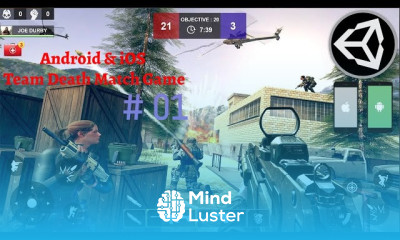
Player Jump Unity 3d game development Course

 (55 reviews)
-
 58 Lessons
-
 38 Students
- Certificate of completion


Player Jump Unity 3d game course, in this course we'll explore the fundamentals of player jumping and how to create engaging and intuitive jump controls that enhance the gameplay experience. The player jump mechanic is a fundamental aspect of many games, allowing players to navigate obstacles, reach higher platforms, and perform acrobatic maneuvers. In this course, we'll cover everything you need to know to implement a variety of jumping mechanics, from basic single jumps to double jumps, wall jumps, and more. We'll start by diving into the basics of player physics and character controllers in Unity 3D, teaching you how to set up your player character and apply gravity and collision detection to enable jumping. You'll learn how to handle player input to trigger jumps, as well as how to adjust jump height, duration, and other parameters to achieve the desired gameplay feel.
 To Register in Course you have to watch at least 30 Second of any lesson
What You'll Learn
-
 Implement player jump mechanics using Unity 3D physics and character controllers effectively
-
Design and customize single, double, and wall jump systems for diverse gameplay experiences
-
Implement responsive jump controls based on player input for intuitive game interaction
-
Adjust jump height, duration, and physics parameters to optimize gameplay feel and challenge
-
Integrate collision detection and gravity to create realistic and smooth jump animations
-
Develop obstacle navigation skills through effective jump mechanics in Unity 3D
-
Create engaging platformer levels utilizing advanced jumping techniques and physics
-
Troubleshoot common issues in jump mechanics to ensure seamless gameplay performance
-
Apply scripting techniques to enhance jump responsiveness and control precision
-
Optimize jump mechanics for different game genres, including action and adventure games
-
Implement visual and audio effects to enhance the player's jumping experience
-
Develop a comprehensive understanding of player physics to improve overall game design
Course Content
58 Lessons • 7 h 21 m total

Android iOS Game Development Tutorial Build Unity 3D PUBG TDM Counter Strike Mobile Game Clone
Unity 3D Mobile Utilized Map Environment iOS Android PUBG TDM Counter Strike Mobile Game Clone
Unity 3D Mobile Utilized Game Assets iOS and Android PUBG TDM Counter Strike Mobile Game Clone
Unity 3D Mobile Utilized Map Environment Android iOS PUBG TDM Counter Strike Mobile Game Clone
Unity Mobile Controls 3d Game Development Course Add Player Character TPS TDM PubG Mobile Clone
Unity Mobile Controls TPS 3d Game Development Course Add Cinemachine to Unity TDM PubG Mobile
Player Movement Unity 3d with Animation Android iOS Game Development TPS TDM PubG Mobile Clone
Make Player Rotating Movement in Unity 3d Game Development Course Unity Mobile Controls Tutorial
Make Enemy Turning Smooth Unity Mobile Controls TPS TDM PubG 3d Game Development Course 2022
Unity 3D Mobile Controls Rotate Player with Camera Unity iOS Android Game Development Course 2022
Unity 3D Mobile Controls PUBG TDM Android iOS Game Development Course Unity Add Gravity Tutorial
Player Jump Unity 3d Game Development Tutorial Android iOS Unity 3D Mobile Controllers Course 2022
Unity 3D Player Sprint Sensitivity Tutorial iOS Android Counter Strike 3d Game Development Course
Player Animator Controller Unity 3D Android iOS Game Development Tutorial TDM Pub Mobile Clone
Add Animations to Player Unity 3D Mobile Game Development Android iOS CS Counter Strike Clone 2022
Shooting RayCast Unity C Tutorial PubG Mobile TDM iOS Android Game Development Full Course 2022
Crosshair Unity 3d Switch Camera in Unity Android iOS CS Counter Strike Game Development Course
Unity Damage System Damage Random Object in Unity 3D Game Engine Tutorial Counter Strike Clone
Unity Rifle Firecharge Mount Unity 3D Mobile Game Development Android iOS Counter Strike Clone
Unity 3D Mag Ammo System Make Android iOS Counter Strike Game Clone using Unity Game Engine
Rifle Animation Unity 3D Mobile Game Development Course Android iOS CS Counter Strike Clone 2022
Unity 3D Rifle Animations Tutorial Mobile iOS Android Counter Strike Game Development Course
Unity 3D Muzzle Flash Tutorial Build Unity 3D PUBG TDM Counter Strike Mobile Game Clone Course
Muzzle Flash Effect Impact Effect Build Unity 3D PUBG TDM Counter Strike Mobile Game Clone
Unity 3D Enemy Ai Baking Environment Build Unity 3D PUBG TDM Counter Strike Mobile Game Clone
Enemy Weapon System Unity 3D Mobile iOS Android Game Development Full Course PubG TDM Clone
Enemy Chase Player Ai Unity 3D Mobile iOS Android Game Development Full Course PubG TDM Clone
Enemy Weapon System Shooting State Unity 3D Mobile iOS Android Game Development Full Course
Enemy Damage Player Unity 3D Mobile Game Development iOS Android PubG TDM Clone Full Course 2022
Player Damage Enemy Ai Tutorial Unity 3D Mobile Game Development iOS Android PubG TDM Clone Course
Unity Respawn Player after death Respawn Enemy 3D iOS Android PubG TDM Clone Full Course 2022
Enemy Animation Unity 3d Mobile Game Development iOS Android Counter Strike Clone Course 2022
Enemy Animation Unity 3d Mobile Game Development iOS Android Counter Strike Game Clone Course
Attach Rifle Gun to Enemy Character in Unity 3D Game Engine iOS Android Counter Strike Game Course
How to add Enemies in Unity 3D Mobile Game iOS Android Counter Strike Game Clone Course 2022
Add Enemies in Unity 3D Mobile Game iOS Android PubG TDM Counter Strike Game Clone Course 2022
Unity Player Ai Unity3d Mobile Android iOS Game Development Course Build PUBG Mobile TDM Clone
Muzzle Flash Spark Player AI Enemy AI in Unity 3d Mobile iOS Android Game Development Course
Unity 3d Player Team Mates AI Team Death Match PubG Mobile iOS Android Game Development Course
Unity Footsteps Tutorial Player Footsteps Unity 3d Mobile iOS Android Game Development Course

How to Get The Certificate
-
You must have an
Account
on the platform.
-
Complete all lessons.
-
Watch at least 50% of Lesson Duration.
-
Get your Certificate free 🎉 !
4.8
(55 reviews)
Overall rating

Reviews
Be the First One Review This Course
Related Courses
View All
















Player Jump Unity 3d game development Course Description
Player Jump Unity 3d game course, in this course we'll explore the fundamentals of player jumping and how to create engaging and intuitive jump controls that enhance the gameplay experience. The player jump mechanic is a fundamental aspect of many games, allowing players to navigate obstacles, reach higher platforms, and perform acrobatic maneuvers. In this course, we'll cover everything you need to know to implement a variety of jumping mechanics, from basic single jumps to double jumps, wall jumps, and more. We'll start by diving into the basics of player physics and character controllers in Unity 3D, teaching you how to set up your player character and apply gravity and collision detection to enable jumping. You'll learn how to handle player input to trigger jumps, as well as how to adjust jump height, duration, and other parameters to achieve the desired gameplay feel.
Focus on Learning, Not Ads
Experience the full power of Mindluster with Premium.
No distractions, just pure education.
Cancel your subscription anytime
